Download
Doppel beta 0.1.112
Five steps, in the order you'll hit them. Step 3 is the one nobody warns you about, so we're warning you about it.
-
Check you're on a supported machine
Operating system Windows 10 (64-bit) or Windows 11 Memory 8 GB minimum · 16 GB recommended for local models Download 1.9 GB installer — it includes a local AI model, so there's nothing more to fetch to get working Disk ~5 GB free while installing (the 1.9 GB installer plus the 3.1 GB it unpacks to) · ~3.1 GB once you delete the installer · a larger optional model needs 3 GB or 4.7 GB more Setup time ~15 minutes from the end of the download to your first draft Internet Needed to download. Not needed to draft. The installer is large because the things that would normally run on someone else's servers ship inside it: speech-to-text, text-to-speech and a 1.5 billion-parameter language model, all running on your machine. That is the whole point of Doppel, and it is the honest cost of it. You can swap in a bigger local model later from Settings if you want better answers and have the disk for it.
There is no macOS or Linux build yet.
-
Download the installer
Just need the installer? Download Doppel-Setup-0.1.112.exe directly. You will still need a beta key to open Doppel. It is tied to the email you enter in the form above, and that form is the only place that issues one. If the form will not load, email support@cloneme.today and we will issue a key by hand.
Your beta key
Activate with
SHA-256: Doppel-Setup-0.1.112.exe.sha256, published next to the installer, straight from the build.
Verify your download against it:
certutil -hashfile Doppel-Setup-0.1.112.exe SHA256 -
Windows will warn you. Here's why, and what to click.
When you run the installer, Windows shows a blue box that says "Windows protected your PC." That is expected.
Windows shows this for software from publishers it hasn't seen enough of yet. Doppel is code-signed — every executable in this build is signed and timestamped through Microsoft's Azure Trusted Signing — but SmartScreen also weighs reputation, and reputation starts at zero for a new publisher no matter how the file is signed. So you may still see the warning for a while.
You don't have to take our word for any of that. Before you run it, right-click the installer → Properties → Digital Signatures, or compare the checksum above. And the dialog itself shows you the signature — see below.
Antivirus can add a second pause, after the install. Some products — Norton 360 is one we have watched do it — occasionally hold a launch for inspection, and not only the first one after installing: on the machine we measured it happened on about one launch in thirteen, days apart, to a file that had not changed. When it happens the window does not appear at all, rather than appearing slowly. If nothing shows after a couple of minutes, launch Doppel again — most launches are not held, so the next one is very likely to come up normally.
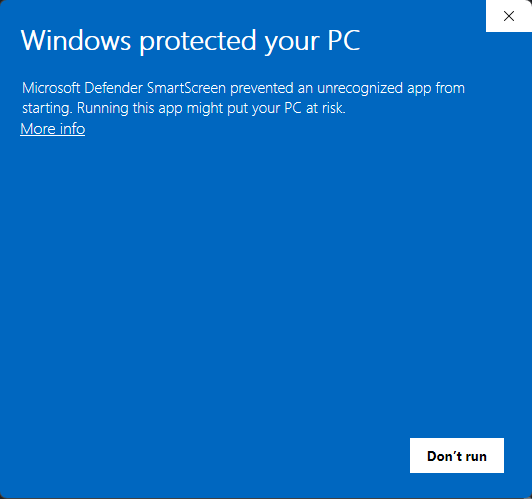
What you see first. Note there is no way to continue yet — only Don't run. That is why people stop here. Two clicks past it:
1. Click More info, the small link under the message.
2. Click Run anyway, the button that appears.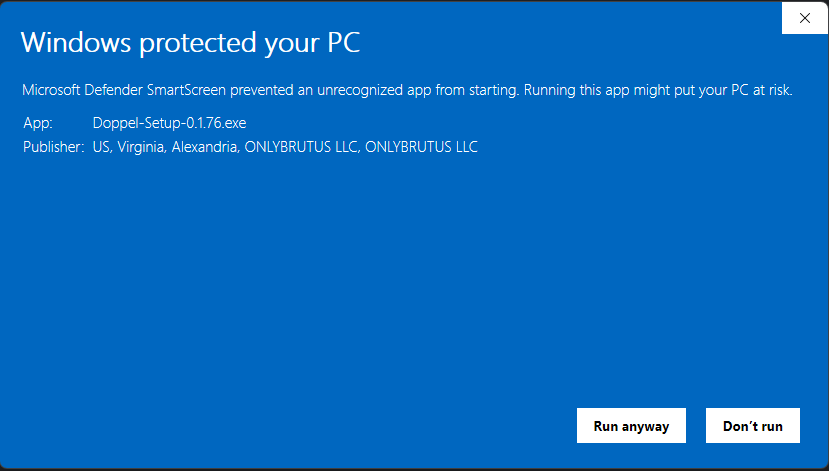
Cropped to the App and Publisher rows — the whole dialog is shown on a wider screen. After More info. Two things appear: the Run anyway button, and a Publisher line. Read the Publisher line before you click Run anyway.
It must include ONLYBRUTUS LLC — the company that signs Doppel. Windows fills that line in from the signature itself; it cannot be typed in by whoever made the file. So this is the one check worth doing every time:
- Contains ONLYBRUTUS LLC — this is our installer. Windows may show the registered address alongside it (US, Virginia, Alexandria); that is normal and still us.
- Unknown publisher, or a different company name — it is not our installer, however you arrived at it. Don't run it, and please tell us where you got it.
-
Set aside about ten minutes for calibration
On first launch Doppel walks you through a short behavioral interview and asks for a few samples of your own writing. This is what makes drafts sound like you instead of like an AI. You can skip it and come back, but drafts will be generic until you do. With the install itself, that's the ~15 minutes quoted above.
Nothing in this step leaves your machine.
-
If something breaks
Doppel has a built-in bug reporter under Settings, which is the fastest route because it attaches diagnostics. You can also email support@cloneme.today.
This is a beta run by one person. Reports get read.